Error, Access to the registry key
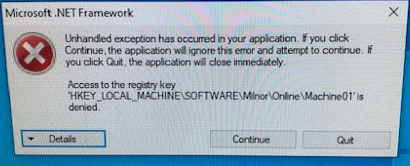
This occurs when you are trying to connect to a Miltouch Machine via the network for Mildata.
This error is caused by a mismatch of the Subnet Mask on the Mildata and/or Multitrac Computer versus on the Miltouch Machine itself.
All Machines must have the same subnet mask.
Select Subnet Mask on Miltouch Machine
To check it on the Miltouch machine
- Select the Gears for Configuration.
- Select the down arrow for page two.
- Click once on the IP address, this will open the Subnet Mask.
Select Subnet Mask on the Mildata or Multitrac
Go to control panel. Click on "
Network and Sharing Center"
- Click "Change adapter settings"
- You will likely see multiple Local Area Connections. We recommend putting all PC's on Local Area Connection 1. It is imperative that all PC's are on the same Local Area Connection.
- In this view the connection on the left is Local Area Connection 1 and counting upward to the right.
- Double Click Local Area Connection 1
- Uncheck Internet Protocol Version 6 (TCP/IPv6) if it is checked.
- Double Click on the "Internet Protocol (TCP/IPv4)" connection listed in the items box.
- Select "Use the following IP addresses" under the "General" tab.
- Type in the IP address that is unique for this PC as noted in the IP address configuration guide below.
- Check the Subnet Mask numbers match on all PCs and Miltouch Machines.


